
You are browsing the Microtonal/Xenharmonic category
Over time I’ve noticed that I get asked this question more and more:
How do I start writing microtonal music?
This always comes from musicians who have enjoyed listening to microtonal music, and are comfortable composing in their own twelveness, but haven’t found the courage or motivation to start experimenting for themselves.
My answer is always the same.
First you gotta get set up with the right tools for the job. In a few hours or less you can set up some free microtonal synths.
The real thing to do, is get ANY microtonal scale up on your instrument, and then play. It’s fine to choose the scale at random. Keep playing until you find something you like about it. Start building up layers over this. This helps you to find how parts of the scale connect with other parts.
After you become a little comfortable with the scale, just try out a different scale and you may find something even better than before. Then over some days or weeks try another and another. Just experiment.
Your composition skills (or lack thereof) shouldn’t hold you back during this time. This is because when you write microtonally you’ll have to discard a lot of the ‘rules’ you already know. Old habits become unable to reinforce themselves. That’s kinda the point of going to all this effort.
Nobody can guide you through microtonal music the same way that they guide you through playing an instrument or learning music theory. There is no established method, instead you get a bazillion competing schools of thought about how to organise and play from the infinite number of scales that are possible. A well-trodden path simply doesn’t exist for you – you make your own path or you don’t enter this forest at all. But if you do make it inside, you’ll find the sweetest fruits. So it’s totally up to you to start trying.
After going through many creative cycles you get to learn about what scales work for you. If you’re the studious type you may be able to read tuning theory concepts and slowly start to grasps small aspects of it.
For me, it was a lot of listening, and a lot of loading randomly-selected scales into my synth to see what I liked and didn’t. A whole lot of failed experiments, and a few that worked. Reading about microtonal tuning theory is overrated, but it can be a starting point for finding interesting scales. If you have nothing more than a good ear, perhaps it’s you who will excel the most in this unknown territory.
And that’s how to start writing microtonal music. It didn’t take anything more than getting your toes wet with a few randomly-selected microtonal scales.
The mtof object can take a MIDI note number and output the frequency of that note in standard 12-tone equal temperament tuning (aka 12-EDO). But what if you want to get away from this musical dogma? How about we start to explore say 13-EDO, 7-EDO, 24-EDO, or 41-EDO with Max/MSP?
Equal temperament on Wikipedia
Equal temperament on the Xenharmonic Wiki
Some years ago I wrote an expression that could quickly be dropped into any Max/MSP synth and then play microtonal equal temperaments. It’s a more generalised version of mtof and I want to share that with you today. It’s an mtof-killer!
First let’s take a quick look inside the mtof object and see how it works. Really, mtof just performs one simple expression.
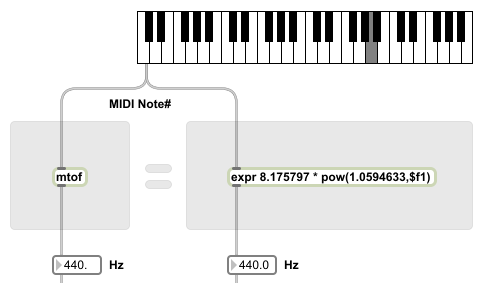 The mtof object on the left always gives the exact same result as the expr on the right. Got it?
Here is my mtof-killer expression in all its beasthood:
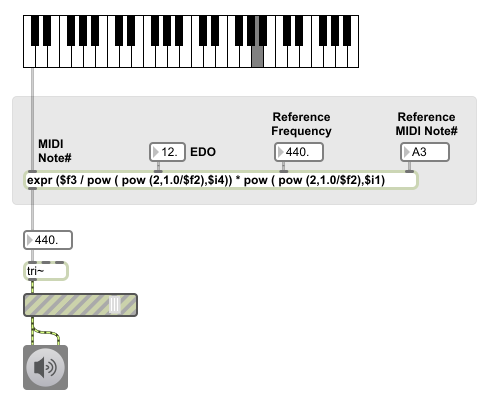
Nasty, right?
Copy and paste this code into Max/MSP and continue along with this tutorial.
----------begin_max5_patcher----------
882.3ocyXE0aaBCD94To9evh0GZlxRwfwD1aapaR8gsIsWampHfSp6.Cy3zl
1p0e6yXGRnYg.AkRSdvN9riuu6ymu6bd53i5YLNYNIy.7Qvkfd8dRJomRVtj
dEB5YD6OOHxOSsPCF49jw2ZLXwbBxbgRtfSedozjYhHhP7PJQu4FYzoL+HCv
uJVwjDlf4Gql23SbpbxhongJgRs7AK7RorYwTlbSUnvtPZpuH3FJa50bRfPq
KanyPyA.aSq7NDNu0xbn4JcK2JM.U6ErLjxnOpfDT9iUh+6wGk2K6FzXJZpO
kUOWL.XPYhRTRY6FsY61pA1sMJuCpGYgp1vKsYb4Igfvulv7GGovY6sdxig9
AOuwSSq1aUiTmiHmh1pLp1i6IQIxsp5iM479h7Ssw9ro6tmLby1Nrda2xEl2
4XVmm71OP26t4RkOlvqlvx8t+e5RZ6zXIOuNjpmBg0QgRzUr0PK2sPrXOUrA
3H6WShckbdruRynCTmSuc22zAiGZK+3hd04wCTRyc2IMDxbHV9wBujzrcOvH
semEQCav05Wl6JkSxHLguflvJYvJOBScZIU.bG6xFZI1zo0oFbvUt+cR9tfj
3XRNmrdEQ+jLgvIr.B3aWb9EfumHHua4phnLRPxLl3EHaBe5XEZFtkXifOmD
EtIOR6Z7HyQ1syxDzIz.0IUc9qXWOUbRzn7N8.6sTQw92arAj6W4j+LS9sGd
U4Vq8M253fVE.8.jf+x4+vX+PcsnxGjq6tGnrCImN5B8nQsnnQKUfPnKZnir
T42.WppdgHYdJGb5ISrAmARStGbpt05pqFHKv8rSlX0W90Snn98Aueqq.1u5
zSaMOdkLMthXmnFTdNTUdts2avKMS8YjUEmLdZPRTBe8TuEMdlPO7FS9Bwsv
OyT+NS88RDVwEPSul+zL85TWbV++fPou7IVy3yRlwCJNoKdnLnjFCIxPvrkA
fub0COKupanggD1K79CoY4kBDVSs.MFX4NTM.XvNGX6.iA2JvhogoIxp.yJh
6nB3X6piVKeLPwnR5ZeaK3FYKntmjgMBX3NGXvFALkyqcmBLuFiKqNEWtMFW
vNEWNMFWls3VLbQNsRiZ1s3Ewz8SSuivyVfFsUHybcqN4DdfdLkoGqSyXvI2
QK9I5+fWCetLsiPlyYFWmEe9HrgbFkBkM+yHSxvn
-----------end_max5_patcher-----------
The ‘EDO’ value sets what equal tempered tuning you want. So a setting of 5 gives you 5-EDO, a setting of 34 gives you 34-EDO.
‘Reference Frequency’ is the standard pitch for the scale. Usually in Western music A = 440 Hz. You can also use 432 Hz if you believe in crystal healing and reptilian world leaders.
‘Reference MIDI Note#’ is the MIDI note to be tuned to the reference frequency (above). This could be MIDI note 69 if you want to tune to middle A, or MIDI note 60 if you want to tune to middle C.
For starters, try 5 for the EDO value, 440 Hz for the reference frequency and 69 for the reference MIDI note number. Have a play on the keyboard. It’s a cool sounding pentatonic scale, right?
If you played with my example patch and got it working, then you don’t need to read this section. Just start using it in your projects and have fun exploring equal temperaments.
But if you absolutely must know how this magic is done, then keep reading! (Warning: I will assume that you already understand how to make expressions with the expr object).
Let’s look back at the original mtof expression, try to understand it, and then try to generalise it.
Output frequency = 8.175797 * pow(1.0594633,$f1)
Note that pow(a,b) is just the expr object’s way of saying a^b.
8.175797 is the frequency (in Hz) for MIDI note 0.
$f1 is the MIDI note number being played.
1.0594633 is the size of the smallest step size in 12-EDO. It is the value of a semitone.
Therefore an mtof object has this general structure:
Output frequency = Frequency of MIDI note 0 * pow(step size,MIDI note number)
Let’s start by swapping the step size of 1.0594633 with the step size from any n-EDO we want. But how do we calculate the step size? For n-EDO, it’s calculated like this:
step size of n-EDO = pow(2,1.0/n)
So let’s bring that into our in-progress generalised mtof:
Output frequency = Frequency of MIDI note 0 * pow( pow(2,1.0/n),MIDI note number )
That’s great, but unless you want MIDI note 0 to always be equal to 8.175797 Hz, how will we go about tuning our scale up to some standard pitch? Well first we need to know what our standard pitch is (aka reference frequency) and we also need to know what MIDI note number to assign that reference frequency to. Once we know these, we work backwards to find the frequency at MIDI note 0.
If our reference MIDI note number is higher than 0, then the frequency at MIDI note 0 will always be lower than the frequency at the reference MIDI note number. In fact:
Frequency at MIDI note 0 = reference frequency / pow(step size,reference MIDI note number)
We can re-use the step size calculation from before and insert it into the above calculation for MIDI note 0 frequency:
Frequency at MIDI note 0 = reference frequency / pow( pow(2,1.0/n),reference MIDI note number )
Above, we’ve just found a way to calculate the frequency at MIDI note 0 for any reference frequency assigned to any MIDI note number for any EDO of size n. That’s the entire left side of the mtof-killer worked out. So let’s bring alllll of this together:
Output frequency = Frequency of MIDI note 0 * pow(step size,MIDI note number)
                 = (reference frequency / pow( pow(2,1.0/n),reference MIDI note number )) * pow( pow(2,1.0/n),MIDI note number )
And finally we replace these English-language variables with integers and floats in expr format, such that:
$i1 = MIDI note number from the keyboard
$f2 = n-EDO
$f3 = reference frequency
$f4 = reference MIDI number
($f3 / pow ( pow (2,1.0/$f2),$i4)) * pow ( pow (2,1.0/$f2),$i1)
Well done if you kept up! I hope that explains how this expression alone can allow you to play microtonal equal tempered tunings in your Max/MSP projects.
UPDATE: Homebrewed methods like my one above are often inefficient. A commenter Toby noted:
This does the same thing in a simpler way:
expr $f3 * pow(2,($f1-$f4)/$f2)
If you need more power than this, for example you wish to create scales with arbitrary and variable step sizes, or you wish to play just intonation scales, then you should read How to play microtonal scales on a Max/MSP synth.
 My recent album Rhythm and Xen uses many microtonal tunings. Give it a spin and see how all of this theory can be used to make accessible music with new moods.
Thanks for listening.
Update: This compilation album has now been released! Check out Next Xen now and download it for free from split-notes. Thanks to everybody who got involved!
split-notes is a digital record label for microtonal music. We have a new compilation album in the works – and we are asking for artists to submit pieces! If you’re a xenharmonic/microtonal composer (or even if you’re not), this is a great opportunity to get heard.
More information: http://split-notes.com/comp2015.php
Let’s see if this project can rouse split-notes from its recent dormancy!
It goes without saying (actually maybe it doesn’t) that if you want to make microtonal music, you need to have the right tools. For my album Rhythm and Xen I found the perfect set of tools that worked for me to get the sound that I wanted. And all while bending notes like a madman.
Stream and download Rhythm and Xen
First the machine: I produced half the tracks on a home-built desktop computer running Windows 7. The other half were produced on an Acer laptop running Windows 8. That should tell you there’s no need to get fancy and expensive, just grab a computer made within the last 5 years and start writing.
My DAW of choice is Ableton Live 9. I used to be an FL Studio user – a really common phrase for my generation – but when I picked up Ableton Live I preferred the workflow and the base functionality. There was no looking back.
As for the default synths that come with Live, throw ‘em out. They can’t be microtuned, so they’re only good for making music that everybody else makes.
For me, the key to making microtonal music in a DAW is to find some microtunable VSTs that you like the sound of. So here are the 5 VSTs I used in Rhythm and Xen:
I love the sound design potential of this synth, and the VA waveforms sound nice for a digital synth.
FM synthesis built from the ground up to get spectrally microtuned sideband partials… what’s not to like? And if you have no idea what I’m talking about, it’s just a good FM synth. :)
Virtual analog with some weird characteristics, quirky yet bold.
It’s a SoundFont player. When you’re craving some 12-bit sounds.
An affordable orchestral sound bank, nuff said. Sadly, the more I work with GPO4, the more I can recognise it from a mile off. So now that Rhythm and Xen is complete I’m gonna retire this one.
As far as VST instruments go, these 5 were all I needed. Although, I did create a couple of my own sound generators in Max/MSP to fulfil other needs. But if you’ve seen my downloadable music resources then you already know what those are.
FX wise, I just love the collection from Variety of Sound. NastyDLA is all over this record, and I used some of their bus compressors in mastering. These plugins are amazing and free!
Oli Larkin’s Endless Series v3 is a really unique effect which can generate Shepard tones, endlessly rising tones. But the killer bit is, it can do endlessly rising or descending phaser and flanger effects too. You can create a sense of urgency doing this (great risers), or else just come up with some cool sound designs.
 In the liner notes for Rhythm and Xen there a track-by-track breakdown of what instruments and compositional techniques were used. Some geeks just gotta know.
Download the album: https://sevish.bandcamp.com/album/rhythm-and-xen
Rhythm and Xen: An album of atmospheric drum & bass, breakbeat and electronic music.
Download Rhythm and Xen by Sevish
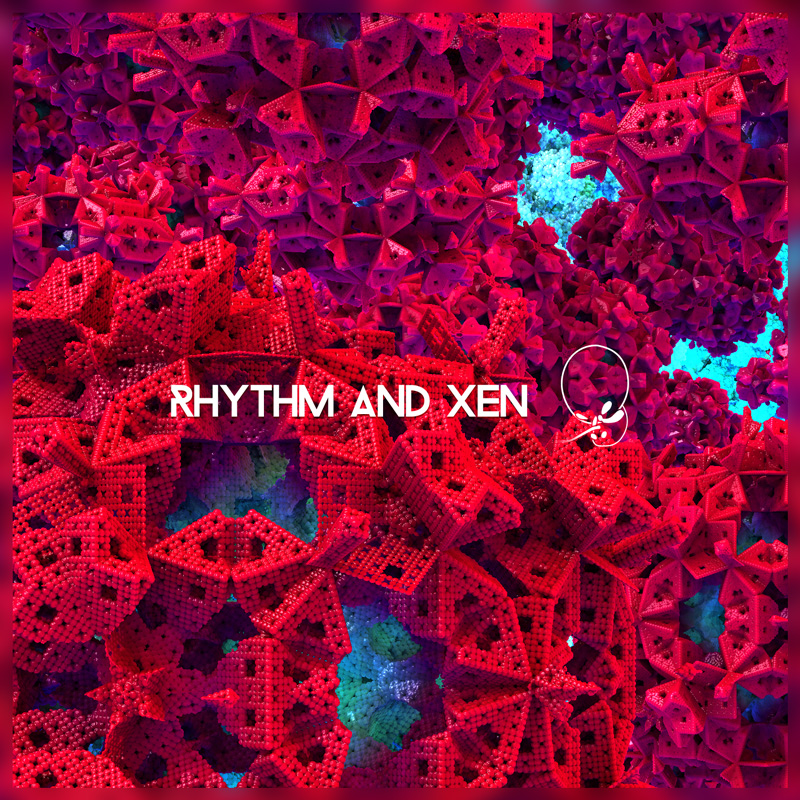
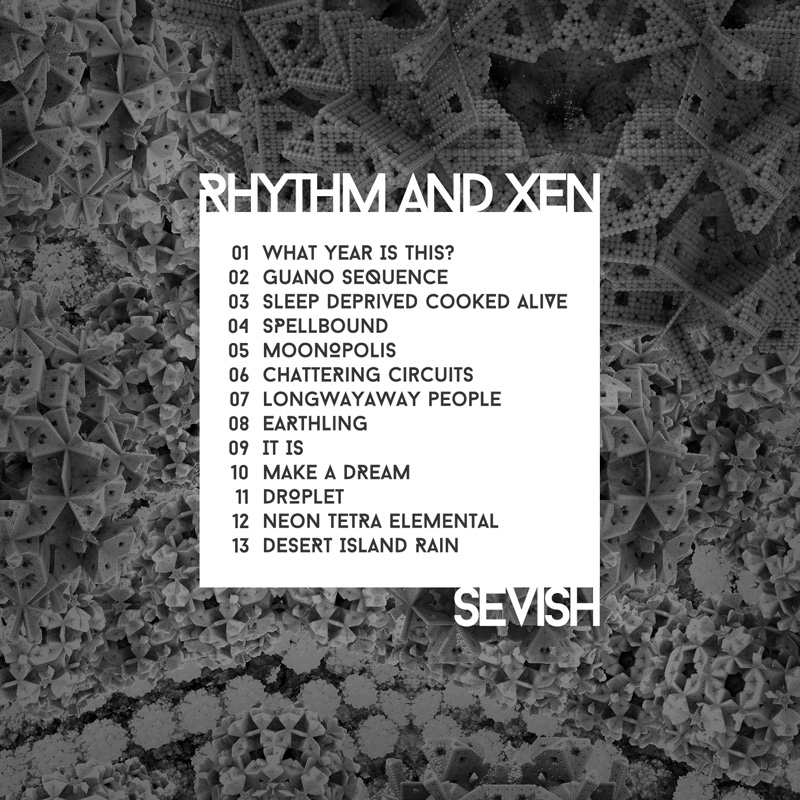
I won’t spoil all the surprises here, except to say that it’s the spiritual successor to my album Golden Hour, and has some influences from Sean but not Heard too. I hope you find it deep & wide; full of layers, details and surprises.
A full-length album like Rhythm and Xen is a huge undertaking. Almost 3 years is how long it took to complete the effort, all in my spare time, while trying to develop my career. For the first time, I’m selling an album of my solo work. Grab it for £4 – it’s more than worth it.
Facebook comments from people who listened on day 1:
“new electronic beat music that’s *actually new*”
“Better than coffee. Springer than spring. You best be listenin'”
“Wild, out of this world textures and sounds. Microtonal, hybrid, dreamy goodness. Kickass sound design.”
https://sevish.bandcamp.com/album/rhythm-and-xen
– Sevish
Sometimes when I am working on a track and I get excited, I will put a demo version up online. Some of those demos were later finished and made it onto Rhythm and Xen, the album that I’ll be releasing on May 10th. Listen back to these lil things and get a glimpse of what’s coming:

5 days to go!
Update: Download Rhythm and Xen now! :)
Release date: 2015/May/10
The wait is almost over!
Announcing Rhythm and Xen, a new album of xenharmonic drum’n’bass and electronic music by Sevish. Rhythm and Xen is the spiritual successor to the album Golden Hour.
It’s called Rhythm and Xen because it’s got rhythm and it’s got xen. Xen means it uses unusual tuning systems (and I’m not talking about drop D here). Most of the melodies in this album can’t be played in standard Western tuning at all. My goal is to explore the vast possibilities of xenharmonic music while keeping the beats fat.
The album touches on drum & bass, breaks, UK bass, 8-bit and 12-bit so it’s quite a mix. It’s 2010s music with a big 1990s influence and a few dreamy throwbacks to the 1980s. I can’t wait to show you more.
7 days to go!
I’m busy working on my new album. I’ve still got a ways to go, but thought it would be nice to recap and post up these very colourful liner notes from 2012’s Sean but not Heard.

| 1 | Lavender Fields | Carlos Alpha |
| 2 | Sniping for Wallies | The harmonic series, and 1-EDO on bass |
| 3 | 20 200 2000 20000 | 17-EDO & a little from a 22 note set based on the 1.3.7.9.11.15 Eikosany |
| 4 | Kowtow | (Forgotten) phi-based scale |
| 5 | The Entity Unmasked | A tetrachordal scale based on superparticular ratios |
| 6 | Marooned at Home | 7-note Mavila |
| 7 | Detached and Distant | 14-EDO |
| 8 | Sea Poem | 9-note Mavila |
| 9 | Faded Orange Glow | 17-EDO |
| 10 | Spuffled Gnorclacks | 17-EDO |
Dr. Ozan Yarman has recorded his qanun and compiled this beautiful SoundFont for you to use in your own work.
http://ozanyarman.com/wpress/2015/01/kanunqanun-soundfont/
Qanun SoundFont (tuned exactly to 12 equal pitches), based on sampled sounds that I obtained from my 79-tone qanun during the Summer months of 2008, which I prepared using PolyPhontics + Audacity at the beginning of 2015.
Try playing Dr. Yarman’s qanun in a SoundFont player that is capable of rendering Turkish or Arabic maqam/makam scales faithfully, such as OneSF2 (Windows, free), Scordatura (Mac OS X, free), or microsynth (Mac OS X, $20) and you’re good to go!
Here’s a helpful Scala tutorial for intermediate tunesmiths. Jacky Ligon (xen-arts.net) has explained batch processing and keyboard mapping in Scala. Batch processing is great if you have 4000 Scala tuning files (.scl) and you wish to export them as, say, MIDI tuning dumps or Anamark TUN files, without saving each file manually! You’ll also get a taste for using text commands in Scala, and creating script files from those commands.
http://xen-arts.net/microtuning-virtual-instruments-part-5/
To be fair I learned a thing or two from this article myself, and I’ll be using these tricks next time I get the chance.